Steps for Working with SSH User Certificates
1. Creating a Certificate Authority
1
2
3
4
5
6
7
8
9
10
11
12
13
14
15
16
17
18
19
20
21
22
23
24
25
26
27
28
29
30
31
32
33
34
35
36
37
38
39
40
41
42
43
44
45
|
 # em

 ssh-keygen -t ed25519 -f ~/.ssh/user_ca_key \

        -C 'User Certificate Authority for *.example.com'

Generating public/private ed25519 key pair.

Enter passphrase (empty for no passphrase):

Enter same passphrase again:

Your identification has been saved in /home/sstutu/.ssh/user_ca_key

Your public key has been saved in /home/sstutu/.ssh/user_ca_key.pub

The key fingerprint is:

SHA256:BkGSbT/R/hP0bbXgyYscZnizaLrNkIv4cuAANSceg4g User Certificate Authority for *.example.com

The key's randomart image is:

+--[ED25519 256]--+

|o.  .+o  .       |

|E * o.o.. . ..  .|

| o * ... o..o.o.o|

|. .    .o..*.+..o|

|.       S.*.=... |

| . .   ..o +o.   |

|  o .  oo    .   |

|   o....=        |

|   .+o o.o       |

+----[SHA256]-----+
|
2. Storing the Public Component of the Certificate Authority on the Server
1
2
3
4
5
|
# 文件位置 /etc/ssh/sshd_config

TrustedUserCAKeys /etc/ssh/user_ca_key.pub
|
3. Processing an Existing Public Key
用户必须已经有一个密钥对,然后提交该对的公钥组件进行签名。签名并将签名的副本转交给正确的人。立即删除此过程的任何工件,因为多余的公钥最多只能造成混乱。在这里,一个名为server01.ed25519.pub的公钥已经被接受,并用它制作了一个证书。
1
2
3
4
5
6
7
8
9
10
11
12
13
14
15
16
17
18
19
20
21
22
23
24
25
26
27
28
29
30
31
32
33
34
35
36
37
38
39
40
41
42
43
44
45
|
# 这里假设要登录 oracle_seoul_146.56.162.255_key

❯ ssh-keygen -t ed25519 -f ~/.ssh/oracle-seoul-146.56.162.255-key \

        -C 'oracle_seoul'

Generating public/private ed25519 key pair.

Enter passphrase (empty for no passphrase):

Enter same passphrase again:

Your identification has been saved in /home/sstutu/.ssh/oracle-seoul-146.56.162.255-key

Your public key has been saved in /home/sstutu/.ssh/oracle-seoul-146.56.162.255-key.pub

The key fingerprint is:

SHA256:TX/XkLaeQwUXGPd/Y/pbGYzMOkfsGb5Nwl/axEcGLTg oracle_seoul

The key's randomart image is:

+--[ED25519 256]--+

|             .+oo|

|             o.=.|

|          . E * +|

|         o .+oo*o|

|        S . .B+=B|

|            *+=*=|

|           o O+o*|

|            o B=+|

|             ..=o|

+----[SHA256]-----+
|
签名公钥 sstutu 账号
1
2
3
4
5
6
7
8
9
10
11
|
❯ cd .ssh

❯ ssh-keygen -s user_ca_key -I 'edcba' -z '0002' -n sstutu \

        oracle-seoul-146.56.162.255-key.pub

Enter passphrase:

Signed user key oracle-seoul-146.56.162.255-key-cert.pub: id "edcba" serial 2 for sstutu valid forever
|
加入用户公钥限制 5分钟
1
2
3
4
5
6
7
8
9
10
11
12
13
|
❯ ssh-keygen -V '+5m' -s user_ca_key -I 'edcba' -z '0002' -n sstutu oracle-seoul-146.56.162.255-key.pub


Enter passphrase:

Signed user key oracle-seoul-146.56.162.255-key-cert.pub: id "edcba" serial 2 for sstutu valid from 2024-04-13T23:36:00 to 2024-04-13T23:42:32
|
查看证书有效性
1
2
3
4
5
6
7
8
9
10
11
12
13
14
15
16
17
18
19
20
21
22
23
24
25
26
27
28
29
30
31
32
33
34
35
36
37
|
$ ssh-keygen -Lf oracle-seoul-146.56.162.255-key-cert.pub

oracle-seoul-146.56.162.255-key-cert.pub:

        Type: [email protected] user certificate

        Public key: ED25519-CERT SHA256:TX/XkLaeQwUXGPd/Y/pbGYzMOkfsGb5Nwl/axEcGLTg

        Signing CA: ED25519 SHA256:BkGSbT/R/hP0bbXgyYscZnizaLrNkIv4cuAANSceg4g (using ssh-ed25519)

        Key ID: "edcba"

        Serial: 2

        Valid: from 2024-04-13T23:36:00 to 2024-04-13T23:42:32

        Principals:

                sstutu

        Critical Options: (none)

        Extensions:

                permit-X11-forwarding

                permit-agent-forwarding

                permit-port-forwarding

                permit-pty

                permit-user-rc
|
到时间的登录效果(要求密码)
4. Logging in Using an SSH User Certificate
1
2
3
4
5
|
$ ssh -o CertificateFile=oracle-seoul-146.56.162.255-key-cert.pub -i oracle-seoul-146.56.162.255-key \
[email protected]
|
ssh_config 配置
1
2
3
4
5
6
7
8
9
10
11
12
13
14
15
16
17
18
19
20
21
22
23
24
25
26
27
28
29
30
31
32
33
34
35
|
# Global settings
# Specify the location of user-specific known_hosts file
#UserKnownHostsFile ~/.ssh/my_known_hosts
# Specify the location of system-wide known_hosts file
#GlobalKnownHostsFile /etc/ssh/ssh_known_hosts
GlobalKnownHostsFile "C:\Users\sstutu\Documents\env\.ssh\ssh_known_hosts"
Host oracle-seoul 146.56.162.255
Hostname 146.56.162.255
User sstutu
Port 22
IdentitiesOnly yes
IdentityFile "C:\Users\sstutu\Documents\env\.ssh\oracle-seoul-146.56.162.255-key"
CertificateFile "C:\Users\sstutu\Documents\env\.ssh\oracle-seoul-146.56.162.255-key-cert.pub"
|
SSH Host Certificates
Files Associated with SSH Host Certificates
Steps for Using SSH Host Certificates
1. Creating a Certificate Authority
1
2
3
4
5
6
7
8
9
10
11
12
13
14
15
16
17
18
19
20
21
22
23
24
25
26
27
28
29
30
31
32
33
34
35
36
37
38
39
40
41
42
43
44
45
46
47
|
# yb
❯ ssh-keygen -t ecdsa -f ~/.ssh/ca_key \
-C 'Host Certficate Authority for *.example.com'
Generating public/private ecdsa key pair.
Enter passphrase (empty for no passphrase):
Enter same passphrase again:
Your identification has been saved in /home/sstutu/.ssh/ca_key
Your public key has been saved in /home/sstutu/.ssh/ca_key.pub
The key fingerprint is:
SHA256:gQPaT+JilHSUm1nhVsv6yF1PGuJXE+Z7qOHuYNI789c Host Certficate Authority for *.example.com
The key's randomart image is:
+---[ECDSA 256]---+
| ..+.... |
| . =.o.+ . |
| + o=* + o |
| . .+= o . o . |
| o . o S o = |
| . . . * o * + |
| + B + +.. |
| oo= o..E |
| .**. |
+----[SHA256]-----+
|
2. Fetching and Signing the Host Key
只有公钥被签名。通过可靠的方法获取远程主机的公共主机密钥,对其进行签名,然后将生成的证书上载到服务器。-h选项表示这应该是一个主机证书,-s选项指向用于签名的密钥。在这里,已经从服务器获取了主机密钥ssh_host_ecdsa_key.pub的副本,并将在本地进行处理:
1
2
3
4
5
6
7
8
9
10
11
12
13
14
15
16
17
18
19
20
21
22
23
24
25
26
27
28
29
30
31
32
33
34
35
36
37
38
39
40
41
42
43
44
45
46
47
48
49
50
51
52
53
54
55
|
# 没有给密码

❯ ssh-keygen -h -s ~/.ssh/ca_key -V '+1d' -I abcd -z 00001 \

         -n 146.56.162.255 ./ssh_host_ecdsa_key.pub

Enter passphrase:

Load key "/home/sstutu/.ssh/ca_key": incorrect passphrase supplied to decrypt private key

# 给密码

❯ ssh-keygen -h -s ~/.ssh/ca_key -V '+1d' -I abcd -z 00001 \

         -n 146.56.162.255 ./ssh_host_ecdsa_key.pub

Enter passphrase:

Signed host key ./ssh_host_ecdsa_key-cert.pub: id "abcd" serial 1 for 146.56.162.255 valid from 2024-04-13T21:46:00 to 2024-04-14T21:47:50


# 查看签名密钥

❯ ssh-keygen -L -f ssh_host_ecdsa_key-cert.pub

ssh_host_ecdsa_key-cert.pub:

        Type: [email protected] host certificate

        Public key: ECDSA-CERT SHA256:5OW6W1pmfxIoMI9hHpyQB/vw905KsGWcAybKZWbQZsU

        Signing CA: ECDSA SHA256:gQPaT+JilHSUm1nhVsv6yF1PGuJXE+Z7qOHuYNI789c (using ecdsa-sha2-nistp256)

        Key ID: "abcd"

        Serial: 1

        Valid: from 2024-04-13T21:46:00 to 2024-04-14T21:47:50

        Principals:

                146.56.162.255

        Critical Options: (none)

        Extensions: (none)


公共主机密钥的证书必须转移到服务器可以使用它的地方。这通常意味着找到常规公共主机密钥的同一个目录,默认情况下是/etc/ssh/。检查以确保证书在复制到位后具有正确的权限。

-- 这里补充对上面这句话的理解:就是把 ssh_host_ecdsa_key-cert.pub 传回到服务器
|
3. Publishing the Host Certificate.
1
| HostCertificate /etc/ssh/ssh_host_ecdsa_key-cert.pub
|
至此目标主机的 sshd_config 已经完成了以下配置
1
2
| TrustedUserCAKeys /etc/ssh/user_ca_key.pub
HostCertificate /etc/ssh/ssh_host_ecdsa_key-cert.pub
|
4. Updating Clients to Acknowledge the Designated Certificate Authority
以下引用来自:https://www.ruanyifeng.com/blog/2020/07/ssh-certificate.html
为了让客户端信任服务器证书,必须将 CA 签发服务器证书的公钥host_ca.pub,加到客户端的/etc/ssh/ssh_known_hosts文件(全局级别)或者~/.ssh/known_hosts文件(用户级别)。
具体做法是打开ssh_known_hosts或known_hosts文件,追加一行,开头为@cert-authority *.example.com,然后将host_ca.pub文件的内容(即公钥)粘贴在后面,大概是下面这个样子。
1
2
3
4
5
6
7
8
9
10
11
12
13
14
15
16
17
18
19
20
21
22
23
24
|
# 示例

@cert-authority *.example.com ecdsa-sha2-nistp256 AAAAE2VjZHNhLXNoYTItbmlzdHAyNTYAAAAIbmlzdHAyNTYAAABBBFJQHK0uoOpBfynyKrjF/SjsLMFewUAihosD6UL3/HkaFPI1n3XAg9D7xePyUWf8thR2e0QVl5TeGLdFiGyCgt0=

# 实例

## 获取ca_key.pub公钥内容

❯ cat ca_key.pub

ecdsa-sha2-nistp256 AAAAE2VjZHNhLXNoYTItbmlzdHAyNTYAAAAIbmlzdHAyNTYAAABBBLE333FOc/MVy3v6EEggppN+8110H/b6koUhGpDx6asLKWVkf8X933a/8ruhsex5DKhKQQq2LRyHoGHTHD6yCmo= Host Certficate Authority for *.example.com

## 得出实例

@cert-authority *.example.com ecdsa-sha2-nistp256 AAAAE2VjZHNhLXNoYTItbmlzdHAyNTYAAAAIbmlzdHAyNTYAAABBBLE333FOc/MVy3v6EEggppN+8110H/b6koUhGpDx6asLKWVkf8X933a/8ruhsex5DKhKQQq2LRyHoGHTHD6yCmo= Host Certficate Authority for *.example.com


@cert-authority 146.56.162.255 ecdsa-sha2-nistp256 AAAAE2VjZHNhLXNoYTItbmlzdHAyNTYAAAAIbmlzdHAyNTYAAABBBLE333FOc/MVy3v6EEggppN+8110H/b6koUhGpDx6asLKWVkf8X933a/8ruhsex5DKhKQQq2LRyHoGHTHD6yCmo= Host Certficate Authority for *.example.com
|
测试
ssh_config
1
2
3
4
5
6
7
8
9
10
11
12
13
14
15
16
17
18
19
20
21
22
23
24
25
26
27
28
29
30
31
32
33
34
35
|
# Global settings
# Specify the location of user-specific known_hosts file
#UserKnownHostsFile ~/.ssh/my_known_hosts
# Specify the location of system-wide known_hosts file
#GlobalKnownHostsFile /etc/ssh/ssh_known_hosts
GlobalKnownHostsFile C:\Users\sstutu\Documents\env\.ssh\ssh_known_hosts
Host oracle-seoul 146.56.162.255
Hostname 146.56.162.255
User sstutu
Port 22202
IdentitiesOnly yes
IdentityFile C:\Users\sstutu\Documents\env\.ssh\oracle-seoul-146.56.162.255-key
CertificateFile C:\Users\sstutu\Documents\env\.ssh\oracle-seoul-146.56.162.255-key-cert.pub
|
git_bash 找不到文件
1
2
3
4
5
6
7
8
9
|
sstutu@DESKTOP-NB7SM70 MINGW64 ~/Documents/env/.ssh

$ ssh -F ssh_config oracle-seoul

no such identity: \342\200\252\342\200\252C:\\Users\\sstutu\\Documents\\env\\.ssh\\oracle-seoul-146.56.162.255-key: No such file or directory

[email protected]'s password:
|
vscode 打开后发现
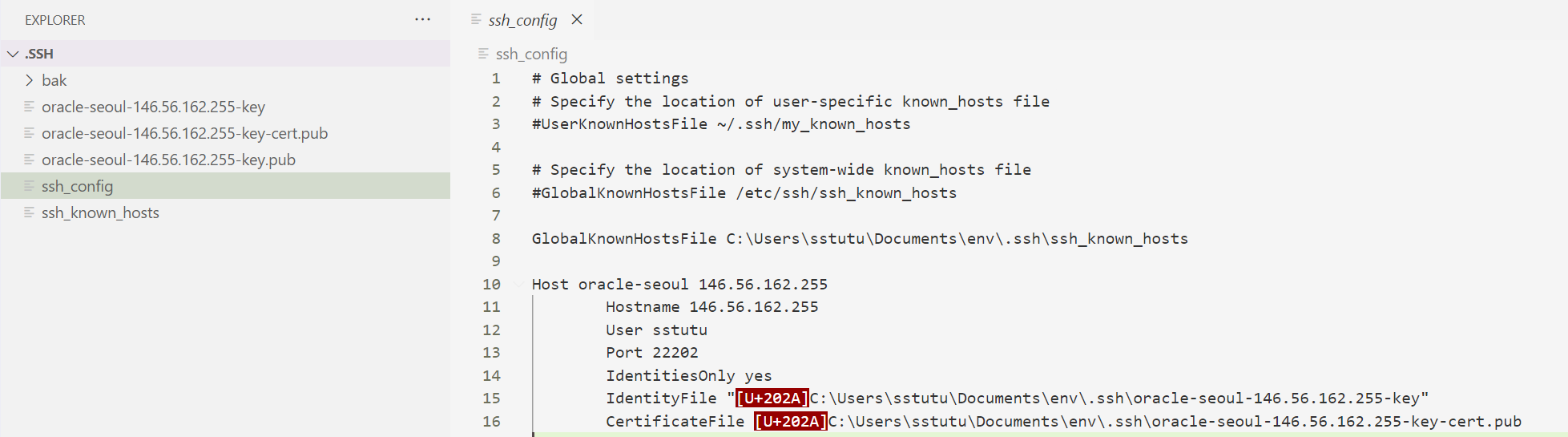
最终实现了登录
1
2
3
4
5
6
7
8
9
10
11
12
13
14
15
16
17
18
19
20
21
22
23
24
25
26
27
28
29
30
31
|
sstutu@DESKTOP-NB7SM70 MINGW64 ~/Documents/env/.ssh

$ ssh -F ssh_config oracle-seoul

Linux arm 5.10.0-28-arm64 #1 SMP Debian 5.10.209-2 (2024-01-31) aarch64


The programs included with the Debian GNU/Linux system are free software;

the exact distribution terms for each program are described in the

individual files in /usr/share/doc/*/copyright.


Debian GNU/Linux comes with ABSOLUTELY NO WARRANTY, to the extent

permitted by applicable law.

Web console: https://arm.vcn06242125.oraclevcn.com:9090/ or https://10.0.0.211:9090/


Last login: Sat Apr 13 08:32:58 2024 from 175.43.41.232

➜  ~
|
Viewing Limitations on User Certificates
1
2
3
4
5
6
7
8
9
10
11
12
13
14
15
16
17
18
19
20
21
22
23
24
25
26
27
28
29
30
31
32
33
34
35
36
37
38
39
|
sstutu@DESKTOP-NB7SM70 MINGW64 ~/Documents/env/.ssh

$ ssh-keygen -Lf oracle-seoul-146.56.162.255-key-cert.pub

oracle-seoul-146.56.162.255-key-cert.pub:

        Type: [email protected] user certificate

        Public key: ED25519-CERT SHA256:TX/XkLaeQwUXGPd/Y/pbGYzMOkfsGb5Nwl/axEcGLTg

        Signing CA: ED25519 SHA256:BkGSbT/R/hP0bbXgyYscZnizaLrNkIv4cuAANSceg4g (using ssh-ed25519)

        Key ID: "edcba"

        Serial: 2

        Valid: forever

        Principals:

                sstutu

        Critical Options: (none)

        Extensions:

                permit-X11-forwarding

                permit-agent-forwarding

                permit-port-forwarding

                permit-pty

                permit-user-rc
|
主机证书的限制
1
2
3
4
5
6
7
8
9
10
11
12
13
14
15
16
17
18
19
20
21
22
23
24
25
26
27
|
➜  ssh ssh-keygen -Lf ssh_host_ecdsa_key-cert.pub

ssh_host_ecdsa_key-cert.pub:

        Type: [email protected] host certificate

        Public key: ECDSA-CERT SHA256:5OW6W1pmfxIoMI9hHpyQB/vw905KsGWcAybKZWbQZsU

        Signing CA: ECDSA SHA256:gQPaT+JilHSUm1nhVsv6yF1PGuJXE+Z7qOHuYNI789c (using ecdsa-sha2-nistp256)

        Key ID: "abcd"

        Serial: 1

        Valid: from 2024-04-13T13:46:00 to 2024-04-14T13:47:50

        Principals:

                146.56.162.255

        Critical Options: (none)

        Extensions: (none)
|
Orchestration of Certificate Deployment
其他
获取realpath
在git_bash 下执行
1
2
3
4
5
6
7
8
9
10
11
12
13
14
15
16
17
18
19
|
sstutu@DESKTOP-NB7SM70 MINGW64 ~/Documents/env/.ssh

$ realpath *

/c/Users/sstutu/Documents/env/.ssh/bak

/c/Users/sstutu/Documents/env/.ssh/oracle-seoul-146.56.162.255-key

/c/Users/sstutu/Documents/env/.ssh/oracle-seoul-146.56.162.255-key-cert.pub

/c/Users/sstutu/Documents/env/.ssh/oracle-seoul-146.56.162.255-key.pub

/c/Users/sstutu/Documents/env/.ssh/ssh_config

/c/Users/sstutu/Documents/env/.ssh/ssh_known_hosts
|